Content clusters are one of the most effective ways to build topical authority and improve your chances of ranking in competitive search results. Instead of publishing disconnected articles, content clusters organize your content into structured topic groups that help both readers and search engines understand the depth of your expertise.
I’ve used content clusters across multiple SEO projects to grow organic traffic and strengthen topical relevance. I’ve created a simple cheat sheet that helps me identify cluster opportunities, structure articles, and ensure each piece contributes to a larger SEO strategy.
In this guide, I’ll walk you through the exact approach I use to build content clusters, from choosing a pillar topic to mapping supporting articles and linking everything together. By the end of this article, you’ll have a practical system you can apply to your own blog or content strategy.
Let’s start with a definition.
What Are Content Clusters?
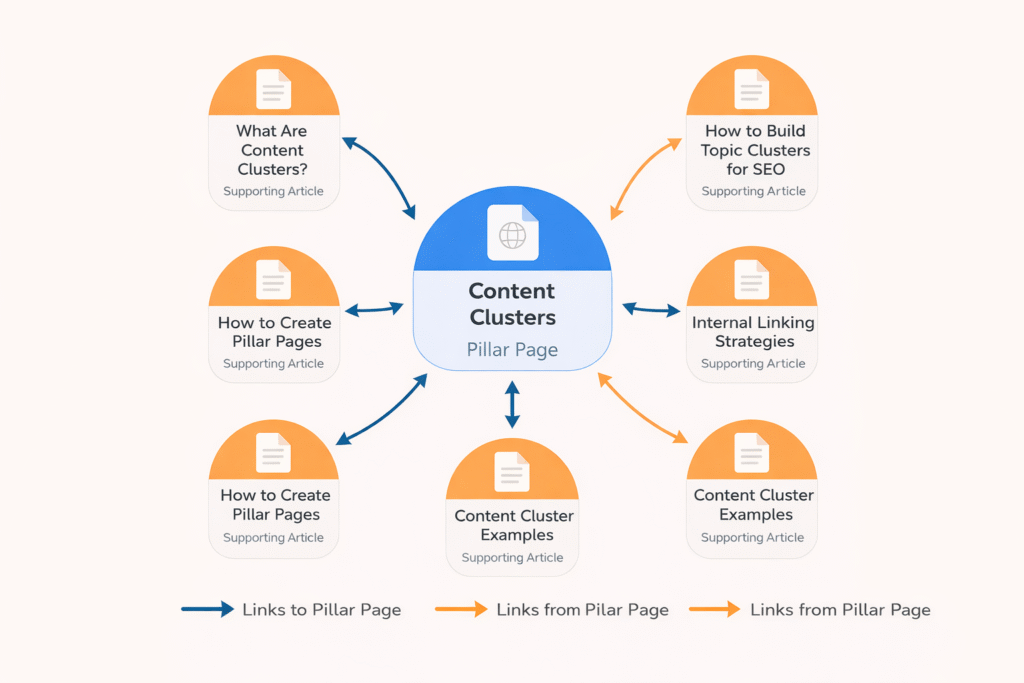
Content clusters are groups of related pages organized around a central topic, often called a pillar page. The pillar page covers the main topic broadly, while supporting articles explore specific subtopics in more detail.
These pages are connected through internal links so search engines can understand their relationship.
A typical content cluster includes:
- A pillar page that targets a broad keyword
- Supporting articles focused on specific subtopics
- Internal links connecting the pages together
This structure helps search engines interpret your site as an authoritative source on the subject.
Instead of ranking individual articles in isolation, clusters allow your entire topic ecosystem to reinforce itself.
This concept is closely related to topical authority and semantic relevance. When your content consistently covers related subtopics, search engines gain confidence that your website has meaningful expertise in that area.
Why Content Clusters Matter for SEO
The reason content clusters work so well is that search engines increasingly evaluate topics rather than individual keywords. A single article might answer one question. But a well-built cluster shows that your site understands the entire topic in depth.
When you publish multiple related articles around a theme, search engines can see that your site consistently covers that subject. Clusters naturally create structured internal links, which help distribute authority across pages and guide crawlers through your content.
Readers can easily move between related topics, increasing engagement and time on site. Instead of competing with a single article, your entire cluster reinforces your relevance to the topic.
My Personal Cheat Sheet for Building Content Clusters
I’ve simplified the process into a repeatable system. Whenever I start a new topic cluster, I follow the same sequence. Each step builds on the previous one, ensuring the cluster remains coherent and useful.
In the next section, I’ll walk through exactly how I approach each step.
Step 1: Choose Your Pillar Topic and Subtopics
Every content cluster starts with a pillar topic. This is the main subject your cluster revolves around and typically targets a broader keyword with significant search demand.
Your pillar page should answer the core question around the topic, while the supporting articles dive deeper into related subtopics.
For example, if your pillar topic is DIY SEO, your supporting cluster articles might include:
- DIY SEO tools
- On-page SEO checklist
- SEO basics for beginners
- Technical SEO for small businesses
- How to do keyword research yourself
The goal is to create a central resource supported by specialized content. So, when selecting a pillar topic, I’d suggest that you look for three things:
- Search demand for the topic
- Strategic relevance to the website or product
- Multiple subtopics that can become cluster articles
If a topic can support multiple supporting articles, I’d say between 6 and 10, it’s usually a good cluster candidate.
Using SEOBoost to Identify Pillar Topics
To identify pillar topics, you can use a combination of topic research tools, keyword research tools, and SEOBoost’s Topic Reports feature.
I use Semrush and LowFruits for the initial keyword research. These help me identify search volume, keyword difficulty, and opportunities for low-hanging fruit. Once I’ve finalized the keyword, I enter it into the SEOBoost Topic Reports feature.
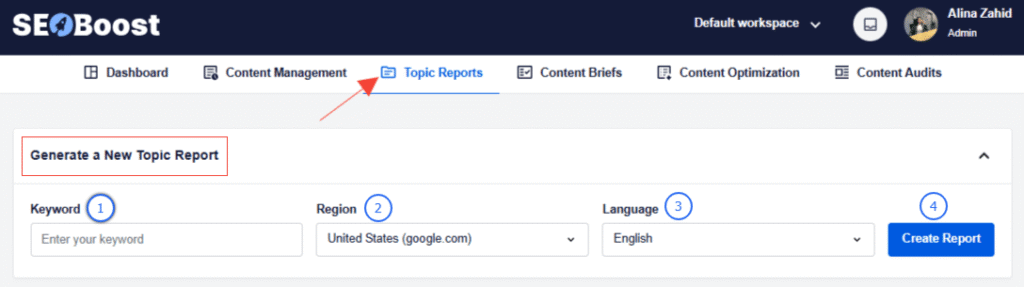
Topic Reports analyze the SERP for the keyword and generate 7 types of reports: related keywords, common subtopics competitors cover, question-based queries, and semantic keyword clusters.
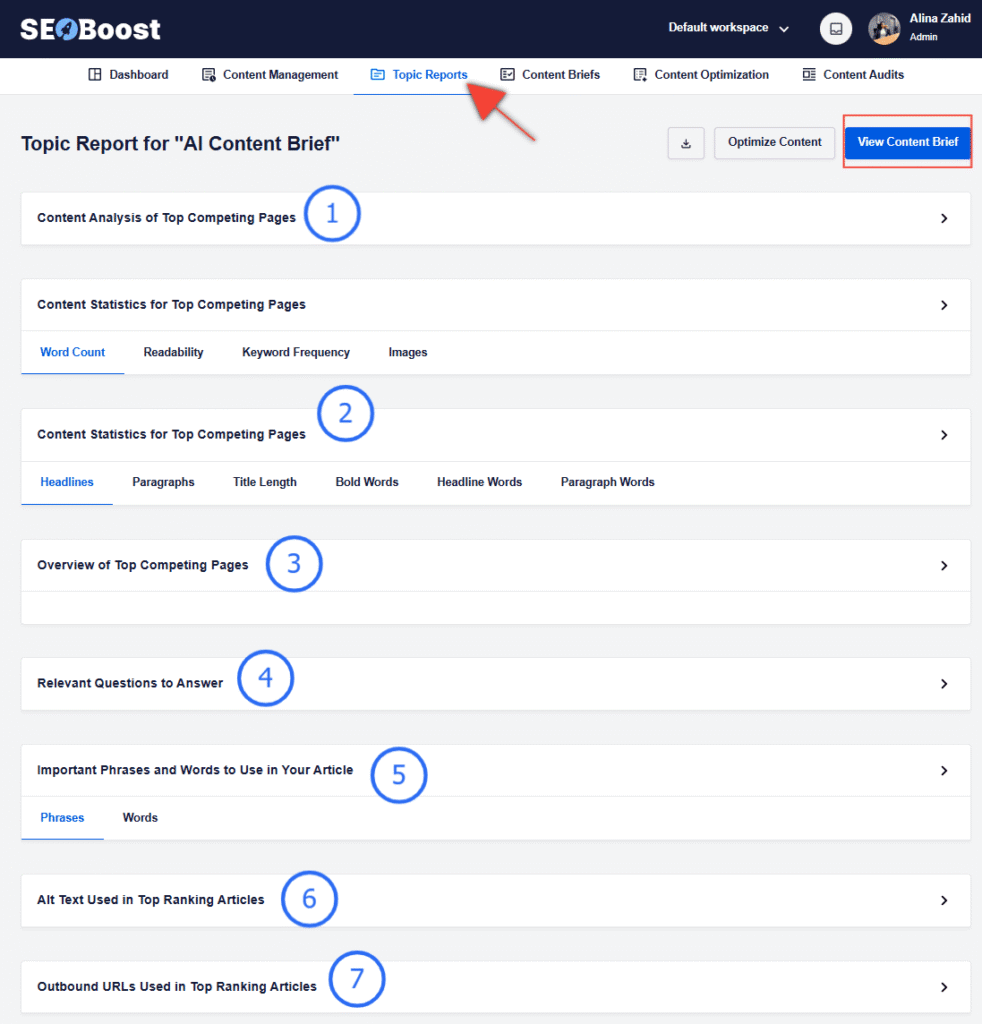
It also includes suggestions for outbound URLs and alt texts, which can help you ideate the content properly. And instead of manually reviewing ten ranking articles, you can immediately see how broad a topic is and whether it can support a cluster.
Step 2: Create Content Outlines
Once the pillar topic is chosen, the next step is to identify the supporting content pieces and create outlines for them. These cluster articles should answer specific questions related to the main topic. Each article targets its own keyword but links back to the pillar page.
Together, these articles form a complete ecosystem around the topic.
I normally generate cluster ideas using SEOBoost’s Topic Reports and Content Briefs features. As I mentioned earlier, Topic Reports help me understand the SERPs better and identify related queries. You can then pull all this data directly to the Content Briefs feature to create structured article outlines.

This feature suggests SEO improvements, including important readability indicators, headings, and content arcs, to add to your content.
By combining Topic Reports and Content Briefs, you can quickly build a list of cluster topics without spending hours in keyword research tools.
Step 3: Create the Pillar Page
The pillar page acts as the hub of your content cluster.
This page should ideally be structured in this format:
- Introduce the main topic
- Link to supporting cluster articles
- Guide readers to deeper resources
- Provide an overview of key concepts
But remember, a pillar page isn’t necessarily meant to answer every detail. Instead, it acts as a gateway page that organizes the cluster.
Before publishing, I run the page’s content through the SEOBoost Content Optimization feature. It acts as a live editor with suggestions to improve the on-page SEO score.
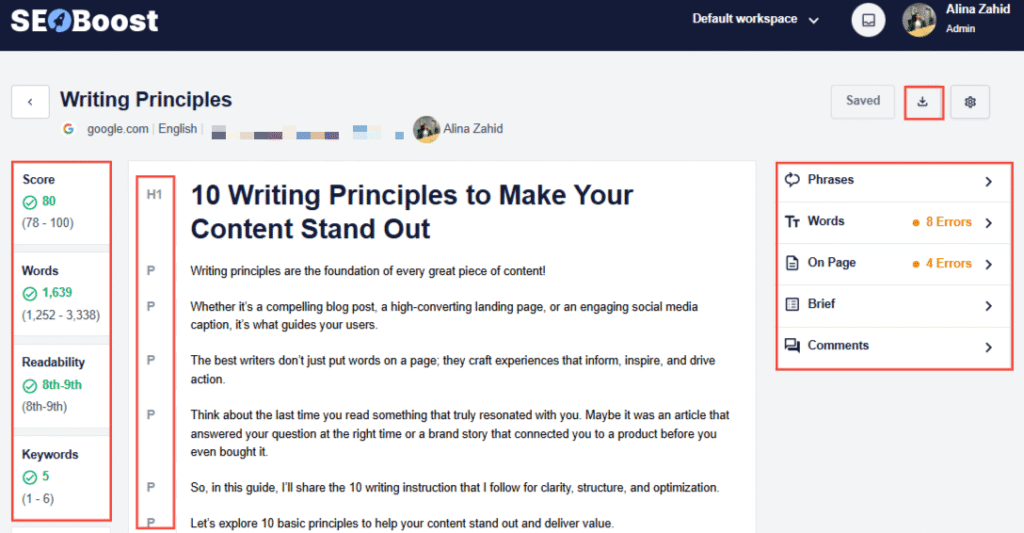
This helps ensure the article includes relevant semantic keywords, balanced heading structure, comprehensive topic coverage, and competitive content depth.
Step 4: Create Supporting Cluster Articles
Once the pillar page exists, the next step is writing the supporting articles.
Each cluster article should:
- Target a specific keyword
- Link back to the pillar page
- Answer a focused question
- Link to related cluster articles when relevant
These articles should be individually valuable, but collectively they reinforce the authority of the pillar page because basically, each article strengthens the others through internal links.
You can also use SEOBoost’s Content Optimization feature for all your content pieces pre-publishing. It would serve as an on-page SEO checklist to ensure your content is fully optimized.
Step 5: Connect Everything With Internal Links
Internal linking is the step that transforms individual articles into a true content cluster. Without clear connections between pages, even well-written articles can remain isolated pieces of content rather than part of a cohesive topic ecosystem.
In a cluster model, the pillar page acts as the central hub while supporting articles expand on specific subtopics. Each of those articles should link back to the pillar page so search engines understand that the pillar represents the primary resource for the topic. The pillar page, in turn, links out to each supporting article to guide readers toward deeper explanations.
This structure creates a network of content that reinforces topical relevance. Instead of Google seeing separate posts, it recognizes a comprehensive set of resources centered on the same subject. That context is one of the reasons content clusters help improve rankings for competitive topics.
When building these connections, it’s helpful to think of the pillar page as the table of contents for the cluster. That’s because readers should be able to move naturally between related topics without feeling like they’ve reached the end of the journey.
Using AIOSEO to Strengthen Internal Linking
As clusters grow, manually tracking internal links becomes difficult. This is where AIOSEO’s Link Assistant feature becomes particularly useful.
Link Assistant scans your website and automatically suggests internal linking opportunities based on your content. Instead of manually searching for pages to connect, you can quickly see which articles should link to your pillar page and which supporting posts should reference each other.
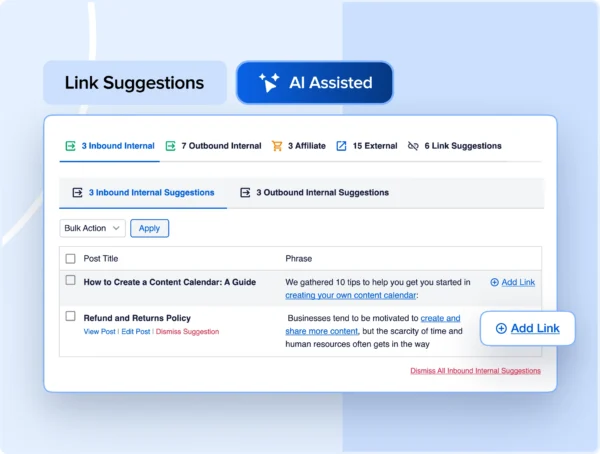
This feature is especially helpful when you’re building clusters over time. New articles often create opportunities to strengthen older content, and Link Assistant makes it easy to identify those opportunities without combing through your entire site.
Final Thoughts
Content clusters are one of the most reliable ways to build topical authority and improve search visibility over time. Instead of publishing disconnected articles that compete with each other, a cluster strategy organizes your content into a clear ecosystem where every page reinforces the others.
When search engines crawl a well-structured cluster, they can easily understand the relationship between the pillar page and its supporting articles. That clarity helps establish your site as a credible resource on the topic, which improves your chances of ranking for both broad and long-tail keywords.
The key is consistency. A single pillar page won’t create authority on its own, but a growing library of well-connected articles will gradually strengthen your position in search results.
With the right process and the right tools, you can turn content creation into a structured system that continuously expands your topical reach.
FAQs
What are the 4 types of clustering?
In SEO and data organization, four common clustering methods are hierarchical clustering, partitioning clustering, density-based clustering, and distribution-based clustering. In content marketing, clustering typically refers to organizing related content around a central topic so search engines can understand the relationship between articles.
How do you create a content cluster?
To create a content cluster, start by identifying a pillar topic that has enough related subtopics to support multiple articles. Then create a comprehensive pillar page that introduces the topic and links to supporting articles. Each supporting article should focus on a specific subtopic and link back to the pillar page, creating a structured internal linking network.
What is an example of a cluster?
An example of a content cluster could be a pillar page on DIY SEO, supported by articles covering topics such as keyword research for beginners, on-page SEO checklists, technical SEO basics, and DIY SEO tools. Each article links back to the pillar page and to related articles within the cluster.
What To Do Next
If you’re planning to build content clusters for your website, the next step is developing a repeatable workflow that makes research, planning, and optimization easier.
Here are a few guides that will help you go deeper:
Learn how to structure topic research before creating clusters in this guide on topic modeling:
https://seoboost.com/blog/topic-modeling/
If you want to optimize your content while writing, explore the tools covered in Best SEO Tools for Content Optimization:
https://seoboost.com/blog/best-seo-tools-for-content/
To improve your internal linking strategy and strengthen your clusters, review SEO Best Practices to Dominate Rankings:
https://seoboost.com/blog/seo-techniques/
These resources will help you move from simply publishing content to building a structured content ecosystem that grows your visibility over time.