If you’re a small business owner trying to grow online, you’ve probably felt the pressure of ‘needing to do SEO.’ And I get it – SEO can sometimes feel overly technical, overly expensive, and overly complicated, especially if you’re wearing multiple hats already. But that’s why you need DIY SEO.
Here’s the truth I’ve learned after working with countless small business owners: You can absolutely do SEO yourself and do it well (with a few important plugins) without hiring an agency or spending thousands.
With the right tools, the right workflow, and a clear understanding of what actually matters, DIY SEO becomes not just manageable, but one of the highest ROI activities you can invest in.
And in this guide, I’m breaking down exactly how DIY SEO for small business can be beneficial.
Let’s start with the basics.
What Is DIY SEO?
DIY SEO (Do-It-Yourself SEO) refers to handling your own search engine optimization tasks in-house, rather than outsourcing them to an agency or consultant. It’s the process of optimizing your website, content, and search presence using accessible tools and simple frameworks that small businesses can manage independently.
DIY SEO focuses on the essentials you can control, which include:
- Finding the right keywords
- Creating helpful content
- Optimizing your website pages
- Improving your local search visibility
- Updating content regularly.
It doesn’t require coding skills, advanced analytics, or a huge team.
But what it does require is consistency, basic SEO knowledge, and the right tools so you’re not guessing.
That’s exactly why I rely on tools like AIOSEO and SEOBoost for small businesses: they handle the research, optimization, and auditing, so the business owner can focus on service, product, and storytelling. But I’ll discuss this more later.
For now, let’s walk you through the DIY SEO framework you can use as a small business owner.
The Complete DIY SEO Framework
You don’t need advanced tools, a technical background, or hours of free time. You just need to understand what truly moves the needle and do it consistently.
Below is the exact DIY SEO workflow I’ve used and would recommend. If you follow these steps, you’ll have a strong, search-friendly website without needing an expensive retainer.
Step 1: Start With the Right Keywords
I’ve seen small business owners do everything right – great content, clean website, beautiful branding, and still not rank because they targeted the wrong keywords.
Keyword research is the foundation of DIY SEO because it tells you what your customers are actually searching for.
I’d recommend targeting long-tail keywords and more niche terms to better match search intent. You can use keyword research tools to search for search volumes and decide which keywords to use and create content for.
Once you’ve done that, this is where SEOBoost’s Topic Reports feature makes life even easier. Instead of manually guessing how to outline your content, you plug in the focus keyphrase, and it generates 7 different types of reports associated with that term.
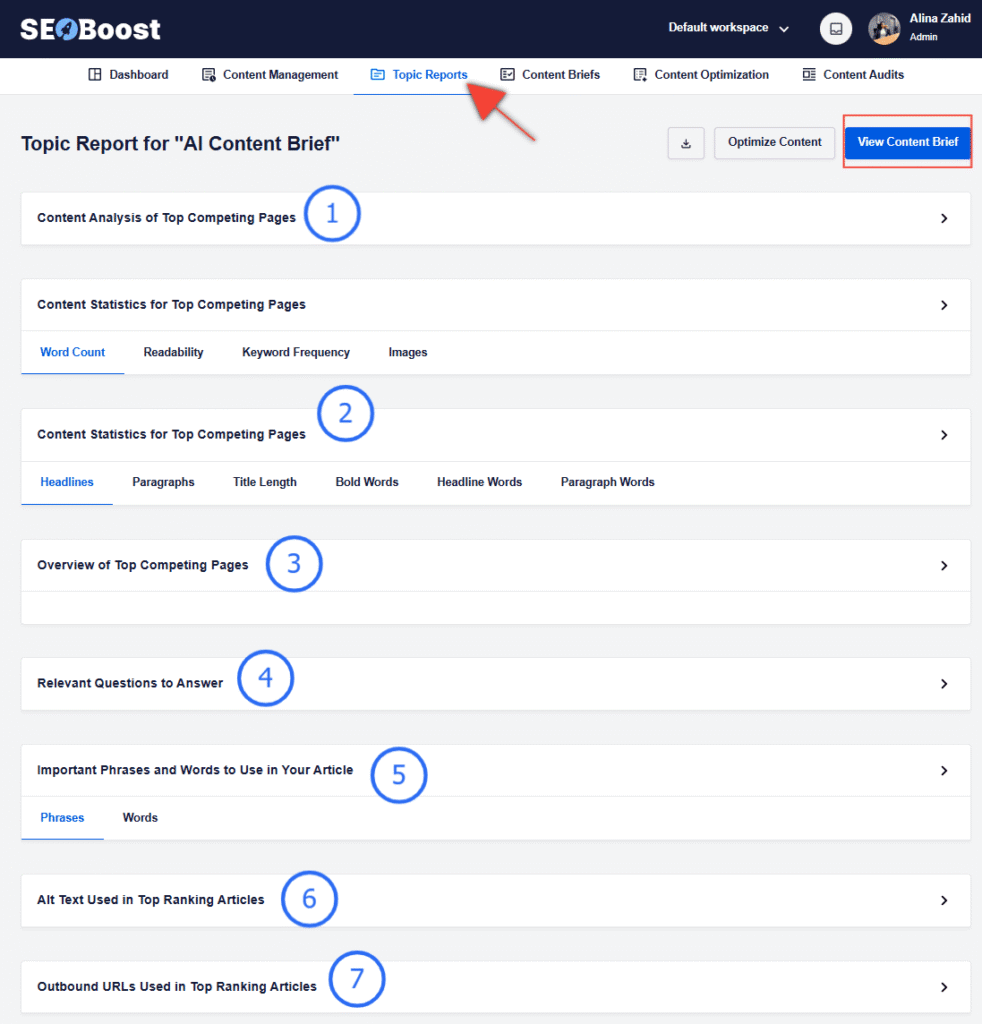
These reports help you understand what your customers search for, related topics you should target, competition levels, search intent, and the subtopics you must include to rank.
For additional long-tail or low-competition opportunities, LowFruits is a great pairing tool, especially for small businesses competing against big brands.
Step 2: Optimize Your Website’s Core Pages First
Before writing new blog posts or adding more content, your core website needs to be optimized. This includes your homepage, about page, service pages, and product pages.
Most small business websites are under-optimized: missing meta descriptions, weak headings, thin copy, no internal linking, and unclear calls to action.
For DIY SEO, the easiest way to fix technical and on-page issues is to use All In One SEO (if you’re on WordPress).
It guides you through every essential setting, like:
- Adding meta titles and descriptions
- Improving readability
- Adding schema markup
- Setting up sitemaps
- Configuring local SEO
- Optimizing content structure
Then I use SEOBoost’s Content Optimization feature to refine the actual writing. It shows me where keywords fit naturally, what sections need expansion, and how to align the page with search intent.
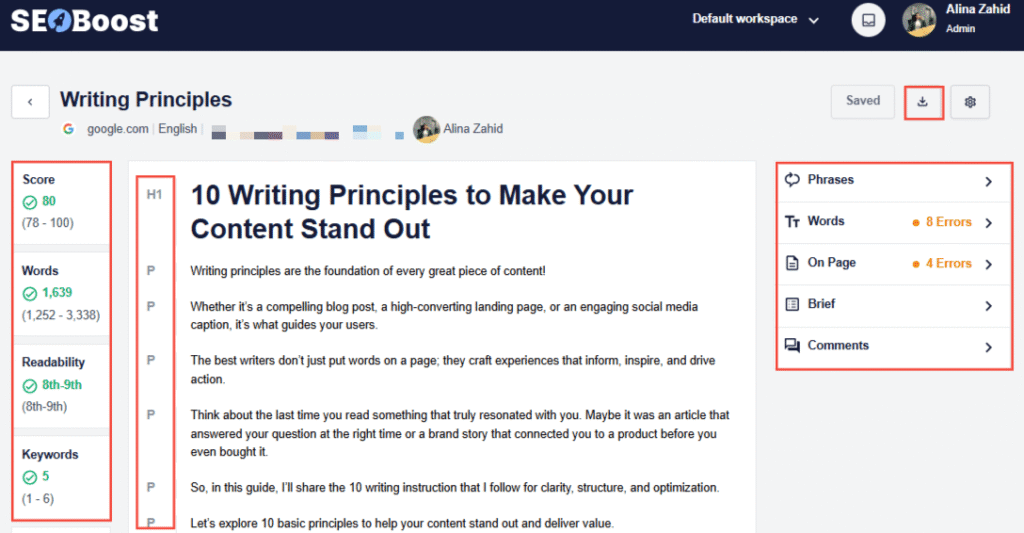
The live editor lets me write, edit, and refine my content in the same app without switching tabs. It’s also great for identifying an on-page SEO score for your content and benchmarking it against existing content.
Step 3: Create High-Quality Content Based on Search Intent
Once your site is optimized, it’s time to create content that attracts customers.
But remember: content isn’t about publishing more, but about publishing what people actually want. That’s where search intent becomes relevant.
Broadly, there are 4 different types of intent you can target, and knowing them all in detail is important to know what type of content you want to create.
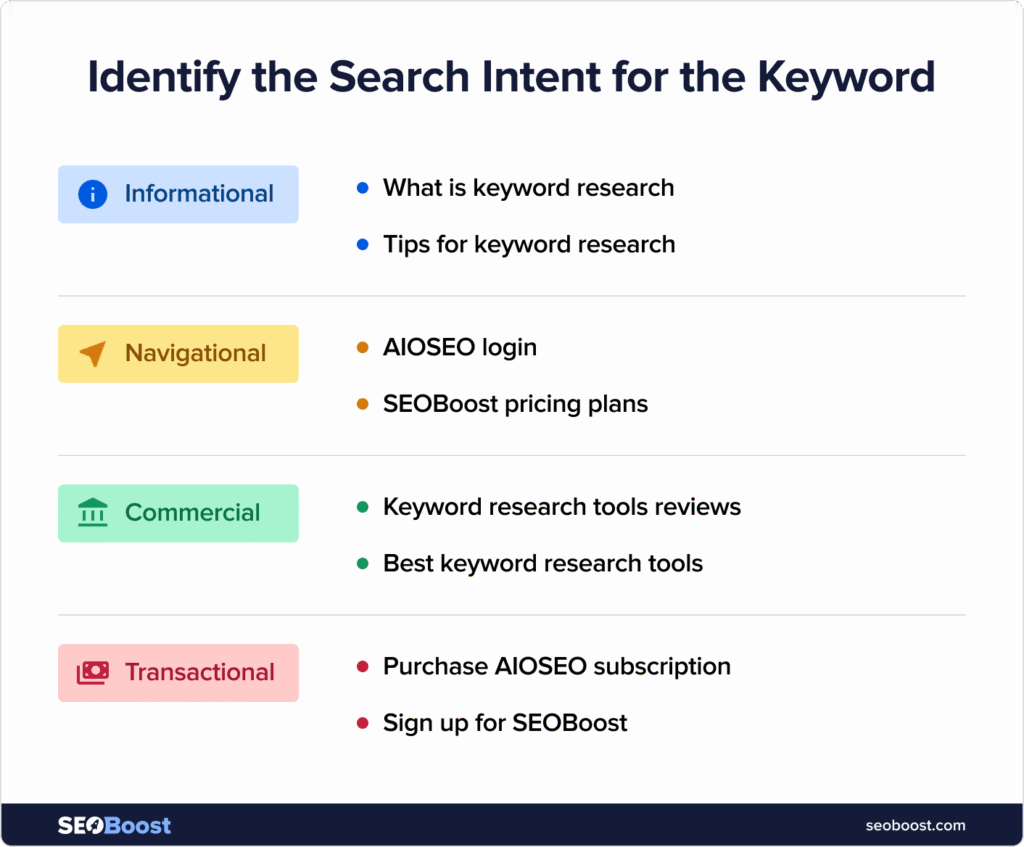
I always start with one simple question: ‘Why is the user searching for this?’
When drafting blogs, I use a mix of AI and manual writing. AI writing tools like Claude help with initial drafts, but turning that draft into a ranking article requires SEOBoost’s optimization layer. Otherwise, your content blends into the AI noise Google is trying to avoid.
Remember, you should aim to create content that fulfills Google’s EEAT guidelines.
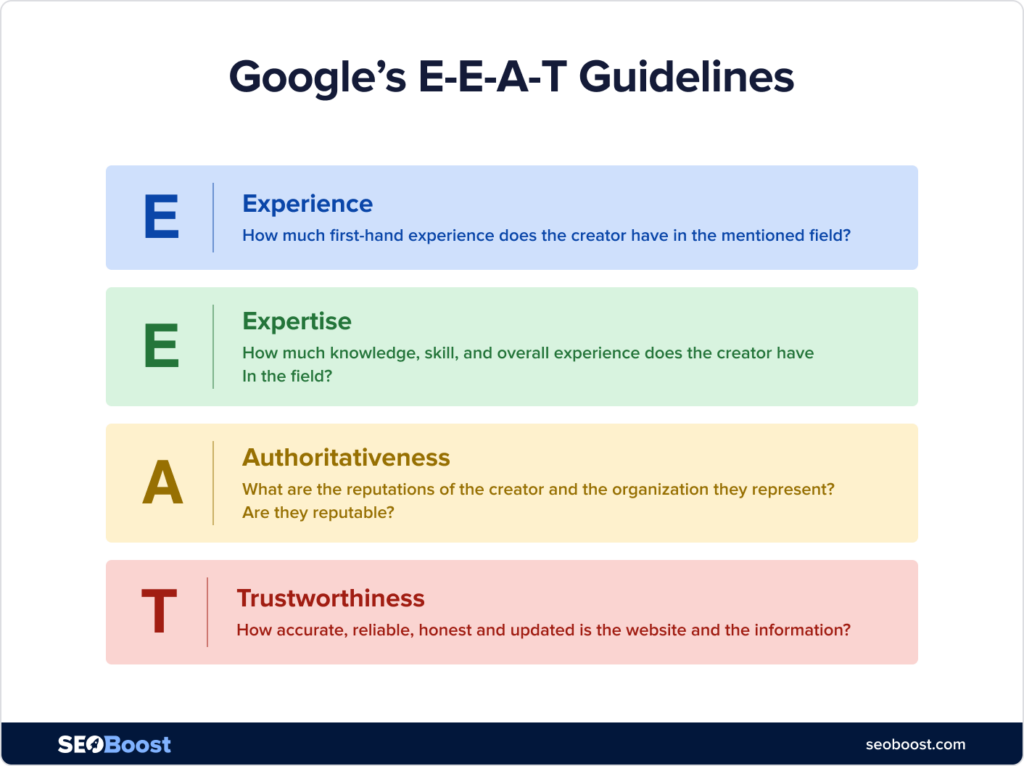
This would not only help me create high-quality content but also allow you to naturally position yourself as an expert in the field by writing from a place of experience and authority.
Step 4: Improve Your Local SEO
If you run a business with a physical location or serve specific areas like plumbers, photographers, real estate agents, salons, cafés, your local SEO can drive a large chunk of your organic leads.
That is why having a Google Business Profile (GBP) is non-negotiable here. Fill out every field, upload photos regularly, and collect reviews consistently.
If you’re a WordPress user, you can also use AIOSEO’s Local SEO features help you add location schema, create optimized location pages, and align your GBP with your website.
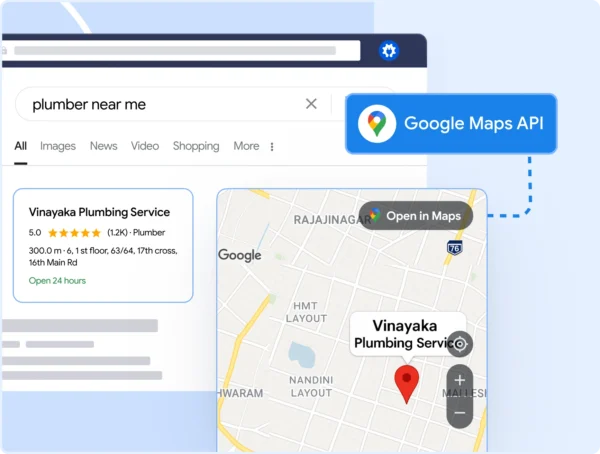
It has an easy migration process and setup that you can easily do on your own. This alone can move you from not appearing anywhere to showing up in Google’s top map results.
Step 5: Strengthen Your Internal Linking
Internal links tell Google which pages are most important. Most small businesses either ignore internal links or add them randomly.
I’d advise creating simple link structures like:
- Service pages link to relevant blog posts
- Blog posts link to service pages
- Related blog posts link to each other
- All major pages link from the homepage
AIOSEO’s Link Assistant feature also helps you automate the process with AI link suggestions. It automatically identifies internal linking opportunities, saving time and ensuring strategic linking.

Using this, you can also keep a track of your site’s internal link health and add new links in seconds.
Step 6: Refresh Old Content Regularly
Do you know what’s one of the biggest SEO myths? Once you publish content, you’re done.
In reality, content decays quickly, sometimes within 3–6 months. That’s because Google constantly updates SERPs, and competitors refresh their pages too.
This is why I rely so much on SEOBoost’s Content Audit feature. It helps you identify content decay and generate reports for existing content to update them.
All you have to do is put in the URL of the content page along with the focus keyword or term you want to improve ranking for. It’ll then generate a complete, color-coded report showing which areas need improvement and what needs updating.
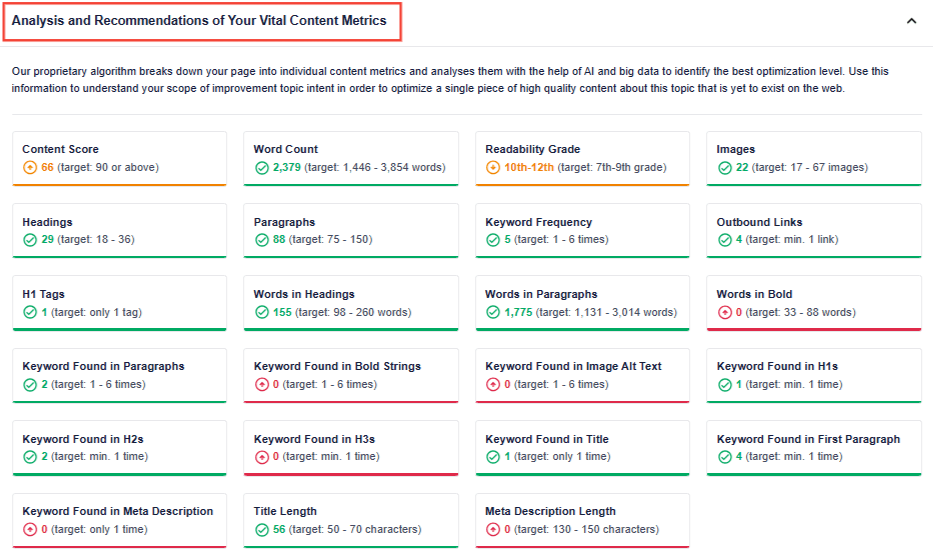
Refreshing content is often faster than writing new articles and often yields bigger ranking gains.
Step 7: Track Only What Matters
And finally, stop chasing vanity metrics that don’t actually matter, not at least in the beginning of your setup.
Small business owners don’t need 20 dashboards. You need to measure three things:
- Organic traffic
- Keyword rankings
- Lead generation and sales
You don’t even need an overpaid tool to do this. You can just set up Google Search Console to show visibility. And if you’re a WordPress user, you can set this up using the AIOSEO plugin, which will also give you access to other beneficial features, some of which I’ve mentioned above.
Final Word
DIY SEO for small business owners is often the smartest strategy. You understand your customers better than any agency. You know your story, your strengths, your market, and your unique selling point. SEO simply gives you the framework to showcase that expertise in a way search engines can understand.
And with tools like SEOBoost guiding your research, optimization, and audits, DIY SEO becomes much easier as you’re no longer guessing what to write.
Remember, even as a small business, you don’t need a massive budget to compete. You need strategic content, well-optimized pages, strong local visibility, and consistency.
Follow the steps in this guide, and you’ll build an SEO system that brings customers to you, month after month, without relying on ads.
FAQs
What are the 5 steps of doing SEO yourself?
The five core steps of DIY SEO are keyword research, website optimization, content creation, internal linking, and ongoing content updates. Once your foundation is strong, tools like SEOBoost and AIOSEO help you maintain rankings with minimal effort.
How long does DIY SEO take to work?
Most small businesses begin to see improvements within 4–12 weeks, depending on their niche and the competitiveness of their keywords. Rankings grow gradually and compound over time. If you use SEO tools to help you automate content and research tasks, you can expect to see faster rankings.
Can beginners do SEO on their own?
Absolutely. Beginners can handle SEO themselves if they follow a structured process and use the right tools. SEOBoost, in particular, is designed to make SEO approachable by breaking down each task with clear guidance and real SERP data.
What tools do I need for DIY SEO?
A lean, effective DIY SEO stack includes SEOBoost (for research, briefs, optimization, and audits), AIOSEO (for WordPress technical SEO), LowFruits (for easy keywords), and Google Search Console (for performance tracking). Optional additions, such as Jasper or ChatGPT, can help with drafting.