DIY SEO tools have completely changed the way marketers approach search engine optimization. What used to require agencies, expensive retainers, and complex technical knowledge can now be managed in-house with the right software stack.
I’ve worked with small businesses, SaaS startups, and content-driven brands that couldn’t justify a full SEO team, but still needed results. And in almost every case, the difference between stagnant traffic and steady growth wasn’t the budget. It was the right tools.
And here’s what I’ve learned over the course of many years: the right DIY SEO tools don’t just save money; they also improve your SEO. They help you identify realistic ranking opportunities and create optimized content faster.
So, in this guide, I’m sharing the 7 DIY SEO tools I genuinely believe every marketer should know about in 2026.
Let’s start with a quick definition.
What Are DIY SEO Tools?
DIY SEO (Do-It-Yourself Search Engine Optimization) is the process of managing your own website’s SEO without hiring an agency or full-time consultant. Instead of outsourcing strategy, keyword research, content optimization, and technical fixes, you use accessible tools and structured workflows to handle it yourself.
And so, to do SEO yourself, you need DIY SEO tools, which are software platforms designed to simplify search engine optimization for non-technical users. They replace complex spreadsheets, manual audits, and guesswork with guided insights and automation.
The best DIY SEO tools help you:
- Optimize content in real time
- Fix technical SEO issues step-by-step
- Monitor traffic and ranking performance
- Discover keywords you can realistically rank for
- Identify content decay before traffic drops significantly
- Analyze competitors without advanced technical knowledge
Unlike enterprise SEO platforms that require deep training, DIY SEO tools are built for action. They focus on clarity and usability rather than overwhelming dashboards.
What Makes a Tool “DIY” for SEO?
One thing you should know is that not every SEO platform qualifies as DIY-friendly.
Some tools are built for enterprise teams with massive budgets and steep learning curves. DIY SEO tools, on the other hand, should be easy to use without technical expertise.
This, in turn, makes them affordable for small businesses and big teams alike, helping them stay focused on practical results.
They’re designed to simplify workflows, not add on to the data-heavy tools and dashboards.
7 DIY SEO Tools All Marketers Should Know About
Now that we’ve laid the foundation, let’s move on to the tools every marketer should know about.
1. SEOBoost

Best for: Marketers building SEO-driven blog content, SaaS teams, and small businesses that want rankings without hiring an agency.
Pricing: Starts at $30/month, but if you sign up for the annual subscription, you can get a discount on the product.
If I had to choose one tool that makes DIY SEO realistic for marketers and small business owners, it would be SEOBoost.
The reason is simple: most people don’t fail at SEO because they can’t write. They fail because they don’t know what to write, how deep to go, or how to structure content to compete. SEOBoost removes that uncertainty by turning SERP data into clear, actionable guidance.
Let’s break down how each of its features directly supports DIY SEO.
Topic Reports
The biggest DIY SEO mistake is targeting the wrong keywords or misunderstanding search intent. Topic Reports fix that at the starting line.
Once you’ve selected a keyword to create content for, using keyword research tools, you can enter it in SEOBoost to generate a topic report. The feature then analyzes live search results and identifies:
- Ideal content depth and structure patterns
- Related semantic terms and secondary keywords
- Question-based queries users expect to be answered
- Common subtopics covered by top-ranking competitors
- What type of content is Google rewarding (guide, listicle, product page, etc)
It generates 7 report types, each of which you can explore in depth to create a well-researched piece of content. For a DIY marketer, this replaces hours of manual SERP analysis.
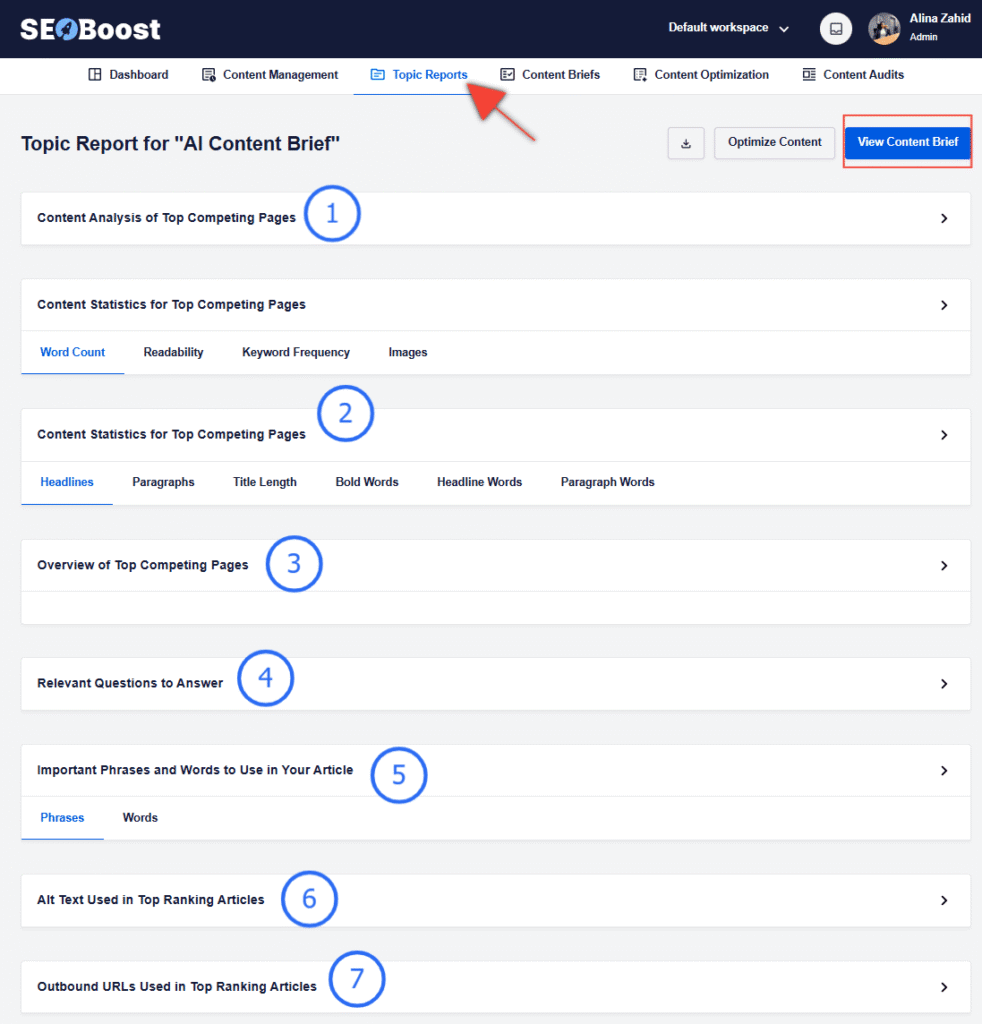
Instead of opening 10 tabs and guessing what matters, you immediately see what your page must include to compete. This prevents wasted effort and ensures every article starts aligned with real ranking expectations.
Content Briefs
Once the research is done, most DIY marketers still struggle with structure. They know the keyword, but not how to build the article.
SEOBoost’s Content Briefs feature works with the Topic Reports feature to automatically generate:
- Required keyword targets
- Recommended subtopics
- SERP-informed optimization notes
- A suggested outline with headings
- Suggested external linking directions
For small businesses without content managers, this is powerful.
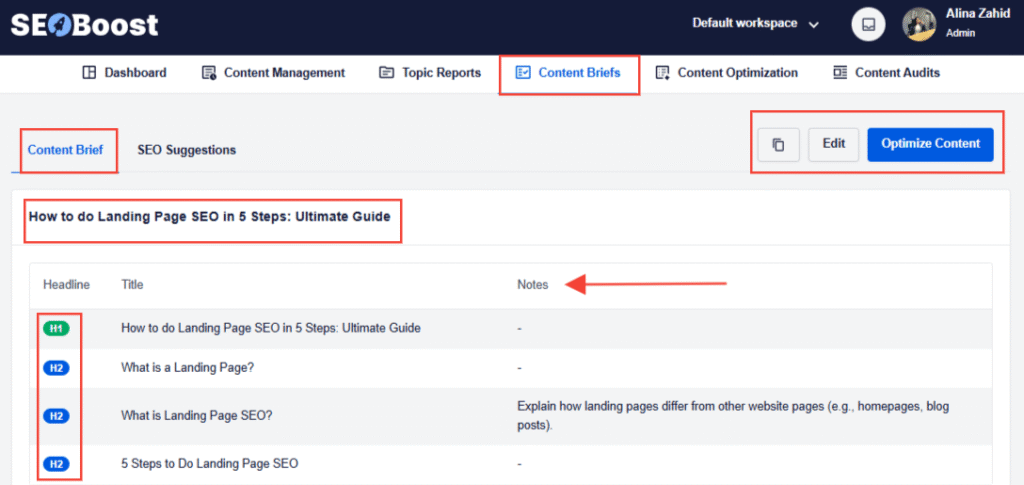
Plus, it ensures consistency. If you’re publishing weekly, every article follows a similar optimization structure, which strengthens topical authority over time.
Content Optimization
This is where DIY SEO becomes manageable.
Instead of writing an article and then wondering whether it’s optimized, the Content Optimization feature scores your draft in real time.
It evaluates:
- Structural balance
- Keyword coverage
- Readability signals
- Semantic term usage
- Content completeness
As you write, your on-page SEO score improves or drops based on how well you align with ranking expectations.
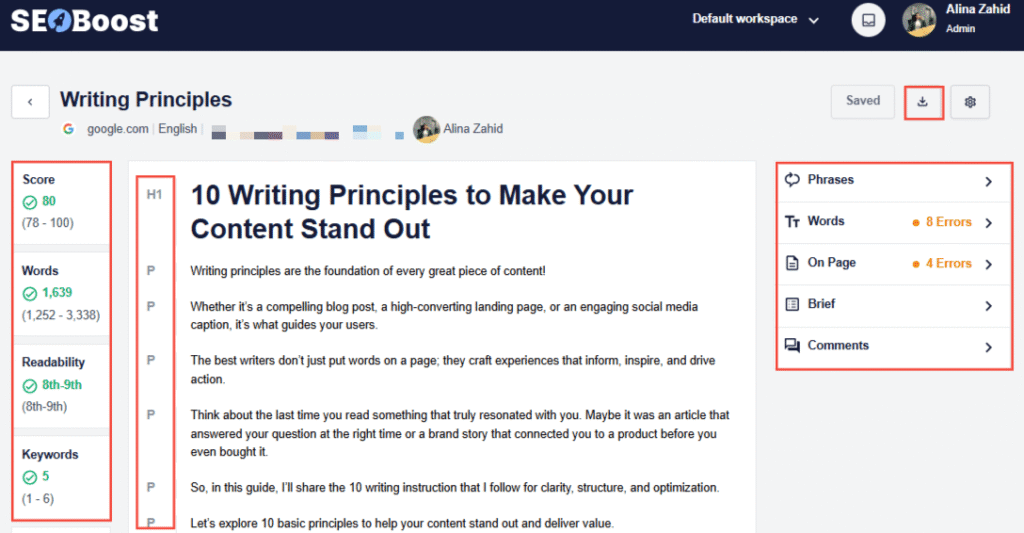
For DIY marketers, this replaces the need for post-publication audits. You optimize before you hit publish.
Content Audits
Publishing is only half the job. Rankings decline over time due to competition, shifts in search intent, or outdated information. This is known as content decay.
This is where using SEOBoost’s Content Audit feature can help. All you have to do is enter the URL of the existing content and the focus keyword you want to improve ranking for.
Using this information, it runs your content across other content pieces and identifies areas for improvement.
You can use this color-coded report to make changes to your content and use those opportunities for quick refresh wins.
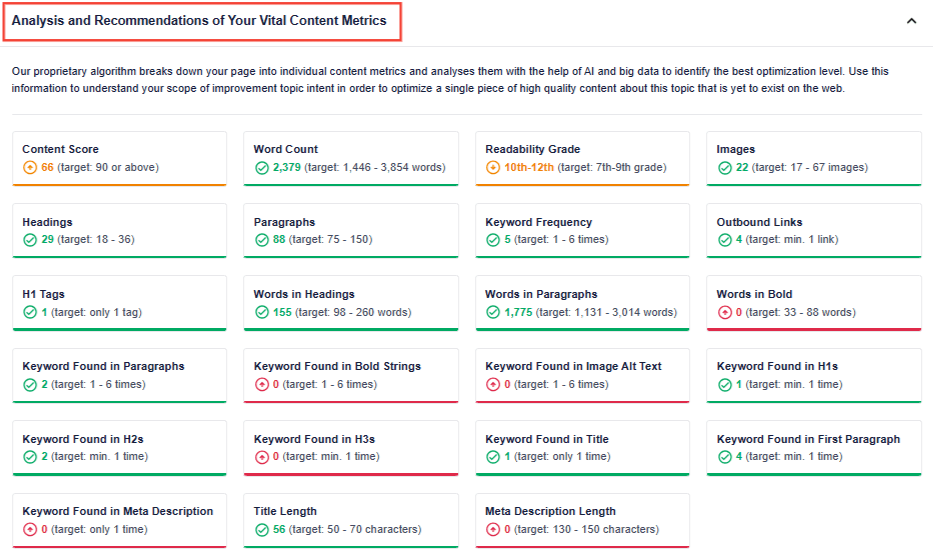
For small businesses, this is critical. Instead of constantly creating new content, you can recover traffic by improving existing pages, often much faster.
Content Management
SEOBoost’s Content Management feature helps solve one of the biggest challenges in DIY SEO: staying organized as your content strategy grows.
When you’re publishing regularly, it’s easy to lose track of ideas, drafts, deadlines, and optimization status across different tools or spreadsheets. Content Management brings everything into one centralized dashboard, allowing marketers to plan, manage, and monitor their entire SEO workflow in one place.

Instead of scattered documents and disconnected systems, you can oversee your content from the initial idea all the way to publication.
Within this system, you can create content projects and campaigns to organize related articles and SEO initiatives. This makes it easier to build structured topic clusters, assign work to team members, and track progress across multiple pieces of content.
It also includes a media planning component that lets you organize visuals, such as screenshots, graphics, and images, alongside your content projects.
For DIY marketers and small teams, this integrated approach simplifies collaboration and removes the need for multiple planning tools.
2. All In One SEO
Best for: WordPress-based websites, businesses, and product owners who want an affordable plugin.
Pricing: AIOSEO Pro starts at $ 49.50/year and offers 4 plans to suit your needs.
If SEOBoost handles strategy and content structure, AIOSEO handles the technical foundation, especially for WordPress users.
One of the biggest reasons DIY SEO feels intimidating is the technical layer. Things like schema markup, sitemaps, redirects, canonical tags, and metadata sound complex, and they can be if you’re doing them manually.
AIOSEO simplifies that entire layer into guided settings inside your WordPress dashboard. Instead of hiring a developer or touching code, you follow clear prompts and toggles.
Here are some of its features that I like and directly support DIY SEO.
Schema Markup
Schema (structured data) tells search engines what your page represents. Without it, Google has to interpret your content entirely on its own.
AIOSEO allows you to apply schema types easily, such as:
- FAQ schema
- Article schema
- Review schema
- Product schema
- Local business schema
For DIY marketers, this matters because schema can improve rich results eligibility, click-through rates, SERP content clarity, and local visibility.
Instead of installing separate plugins or manually adding JSON-LD code, you select the schema type and fill in structured fields.
XML Sitemaps
A sitemap is essentially a roadmap for search engines. It tells Google which pages exist and how they’re structured.
AIOSEO automatically generates and updates your XML sitemap whenever you publish or update content. This means that you don’t need to manually create files, edit code, or submit multiple URLs individually.
For DIY SEO, this ensures new blog posts are discovered faster and that updated content is properly re-crawled.
Redirect Manager
Redirects are often ignored in DIY SEO until traffic drops.
Basically, when you change URLs, delete pages, or reorganize site structure, you risk creating broken links. Broken links hurt user experience and SEO authority.
AIOSEO’s redirect manager allows you to:
- Monitor 404 errors
- Preserve link equity
- Fix broken links quickly
- Set 301 redirects easily
Instead of losing rankings because of structural changes, you maintain continuity. This feature alone can prevent silent traffic leaks.
On-Page Optimization Guidance
While tools like SEOBoost focus on optimization, AIOSEO handles the essential on-page SEO basics inside WordPress.
It guides you on:
- Image alt text
- Headings structure
- Readability signals
- Keyword placement
- Meta titles and descriptions
For DIY marketers, this ensures you’re not missing foundational elements that Google expects. It acts as a checklist, preventing small mistakes from undermining larger strategy efforts.
Local SEO Settings
For local businesses, visibility in Google’s map pack and local search results is critical.
AIOSEO simplifies local SEO by allowing you to:
- Define service areas
- Optimize location pages
- Structure contact information properly
- Add business name, address, and phone schema
This ensures consistency between your website and your Google Business Profile, strengthening local trust signals. Without structured local data, small businesses often struggle to appear in geographically targeted searches.
AI Writing Assistant
AIOSEO also includes an AI writing assistant that helps generate and refine content directly within WordPress.
For DIY marketers, this means faster draft creation, suggested improvements for clarity, and assistance with meta descriptions.
This allows you to refind content without switching platforms, helping with a faster turnaround.
3. LowFruits
Best for: Marketers, agencies, and businesses looking to discover new keyword opportunities and grow traffic sustainably.
Pricing: The standard plan starts at $29.9/month, and it also offers a Pay-as-you-go credit system.
One of the fastest ways to burn out doing DIY SEO is by targeting the wrong keywords. Most marketers instinctively go after high-volume, competitive terms because they look attractive.
But in reality, those keywords are often dominated by enterprise brands, massive content libraries, established domain authority, and strong backlink profiles.
That’s where LowFruits changes the game.
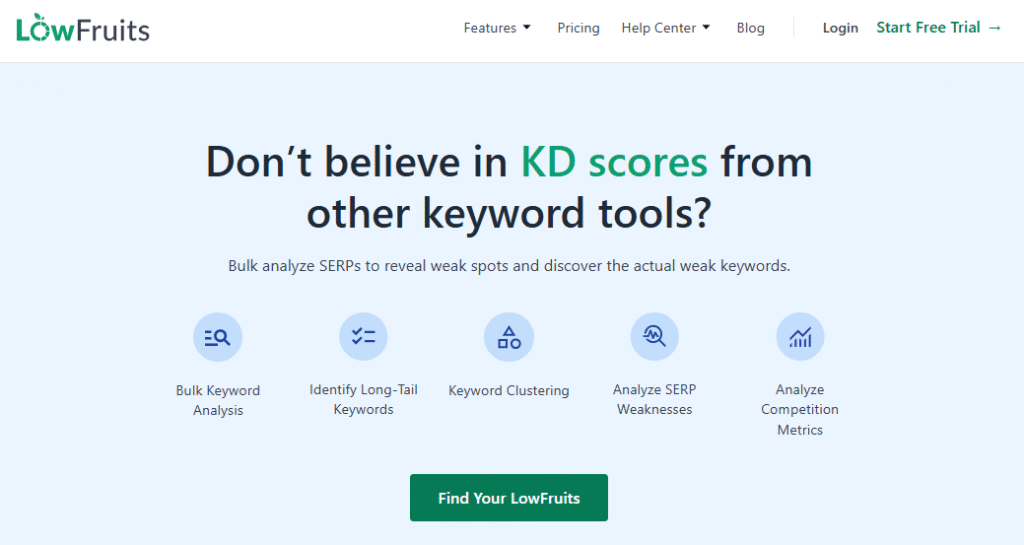
Instead of focusing on vanity keywords, LowFruits helps you identify weak spots in the SERPs, meaning search results where smaller or less authoritative websites are already ranking. If they can rank, you probably can too.
Winning Features
LowFruits begins with keyword research, but it approaches it differently from traditional SEO tools.
Rather than overwhelming you with thousands of high-volume suggestions, it highlights long-tail, less saturated keywords that rank weaker domains and are more achievable for smaller sites.
This is especially useful for local businesses, niche blogs, new SaaS startups, and service-based businesses.
One of its other strongest features is SERP analysis.
It analyzes search results and flags “weak” domains – websites that rank in the top 10 but don’t have strong authority or optimization. When you see weaker sites ranking, it signals an opportunity.
For DIY SEO, this is powerful because it instead of guessing difficulty scores, you see actual ranking patterns. If smaller sites are performing well, you know the barrier to entry isn’t as high as it appears.
It also helps you uncover clusters of related long-tail queries around a niche. This allows you to:
- Strengthen topical relevance
- Build internal linking structures
- Capture incremental traffic gains
- Publish multiple targeted articles
Over time, these small wins compound and help you position your business more effectively.
4. Google Search Console

Best for: DIY marketers who want real search performance data directly from Google.
Pricing: Free
While many SEO tools help you research keywords or analyze competitors, Google Search Console shows you something even more valuable: how your website is actually performing in Google.
Because the data comes directly from Google itself, it gives DIY marketers real insight into what’s working, what’s declining, and where opportunities exist.
Instead of guessing which pages are gaining traction, you can see:
- Click-through rates for each query
- Pages gaining or losing impressions
- Keywords your pages already rank for
- Technical signals like Core Web Vitals
- Indexing issues are preventing visibility
For DIY SEO, this tool becomes your performance dashboard. It reveals hidden opportunities, such as keywords ranking on page two that could move to page one with small improvements.
Another powerful feature is the performance report, which allows you to filter by page or keyword. This helps you identify content that’s close to ranking higher, pages suffering from content decay, and queries you didn’t intentionally target but could optimize for.
Pro Tip: Use data from your GSC dashboard and combine it with SEOBoost’s Content Audit feature to regularly update content.
Instead of starting from scratch every time, you can refine what already works.
And because Search Console highlights indexing issues and crawl errors, it also helps ensure that your content is actually visible to search engines.
5. Ahrefs Webmaster Tools
Best for: Marketers who want technical SEO insights and backlink visibility without investing in a full enterprise SEO tool.
Pricing: Free (for verified websites). Paid plans start from $99 per month, positioning it a bit on the premium side.
Ahrefs is widely known as a premium SEO platform, but Ahrefs Webmaster Tools provides a powerful free subset of its capabilities, especially useful for site health monitoring.
For DIY marketers, one of the biggest challenges is identifying technical issues that quietly hurt rankings. Broken links, crawl errors, and weak internal linking structures can all impact SEO without being immediately obvious.
Ahrefs Webmaster Tools scans your site and generates a detailed audit showing:
- Internal linking gaps
- On-page SEO weaknesses
- Broken links and redirect chains
- Backlink data pointing to your site
- Crawling issues affecting indexability
The backlink report is particularly valuable because it shows which external sites are linking to your pages. Backlinks remain an important authority signal, and this tool allows DIY marketers to monitor them without paying for a full backlink analysis suite.
Over time, running periodic site audits helps maintain SEO health and prevent technical issues from undermining your content strategy.
6. AnswerThePublic
Best for: Content marketers looking to generate blog ideas based on real user search behavior.
Pricing: Free tier available, paid plans start around $99 per month.
One of the hardest parts of DIY SEO is deciding what to write about next.
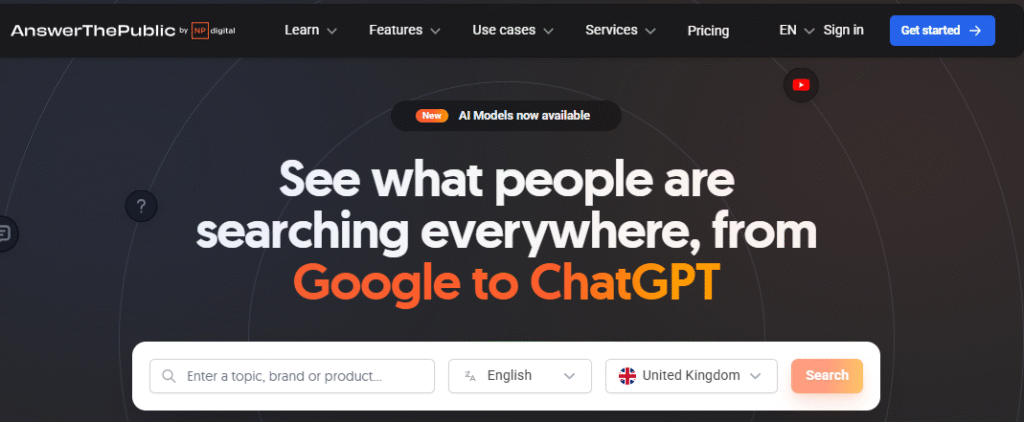
AnswerThePublic solves that by visualizing the real questions people ask around a keyword. Instead of simple keyword lists, it organizes queries into categories like:
- “How” questions
- “Why” questions
- Comparison searches
- Preposition phrases
- Long-tail variations
This helps marketers understand not just what people search for, but how they think about a topic.
For SEO content strategy, this is incredibly useful.
You can turn these questions into blog post topics, FAQ sections, supporting articles in a topic cluster, or even subheadings within a larger guide. By answering real user questions, your content becomes more relevant to search intent, something Google increasingly prioritizes.
7. Copy.ai

Best for: Small teams and marketers who want to accelerate content production without sacrificing consistency.
Pricing: Free tier available, paid plans start around $29 per month.
Even with great keyword research and strategy, SEO ultimately comes down to publishing content consistently.
That’s where Copy.ai becomes helpful for DIY marketers who don’t have the time to write everything from scratch.
Copy.ai uses AI to generate content ideas and draft copy quickly. It’s particularly useful for:
- Blog outlines
- Content rewrites
- Meta descriptions
- Product descriptions
- Social media captions
- Email marketing drafts
Instead of starting with a blank page, you can generate an initial structure and then refine it with your own expertise. This dramatically reduces the time required to produce supporting marketing content around your SEO strategy.
Final Word
DIY SEO has never been more accessible than it is today. With the right tools, marketers and small business owners can research keywords, optimize content, fix technical issues, and monitor performance without relying on expensive agencies.
The key is choosing a small stack of tools that cover the core parts of SEO: research, content creation, optimization, and performance tracking. When used together, tools like SEOBoost, AIOSEO, LowFruits, and Google Search Console create a streamlined workflow that allows you to plan, publish, and improve content strategically.
Just remember that even with all the changes in the search engine space, SEO still requires patience and consistency, but DIY SEO tools remove much of the complexity that once made it inaccessible.
FAQs
Can I do SEO on my own?
Yes, you can absolutely do SEO on your own using the right strategy and DIY SEO tools. Many marketers and small business owners manage their SEO without hiring an agency by focusing on keyword research, content optimization, basic technical SEO, and consistent publishing. DIY SEO tools simplify tasks such as finding keywords, analyzing competitors, optimizing content, and monitoring rankings, making it easier to improve organic visibility without advanced technical expertise.
What is the 80/20 rule for SEO?
The 80/20 rule for SEO means that roughly 80% of your results often come from 20% of your efforts. In practice, this usually means a small number of pages drive the majority of your traffic. Successful SEO strategies focus on identifying and optimizing high-impact pages by improving content, targeting keywords more effectively, implementing internal linking, and keeping them up to date. By prioritizing the pages and keywords that generate the most value, marketers can achieve stronger results with less effort.
Can ChatGPT do SEO?
ChatGPT can assist with SEO tasks, but it cannot fully replace a complete SEO strategy. It can help generate content ideas, draft blog posts, write meta descriptions, suggest keywords, and create outlines. However, effective SEO still requires keyword research, competitor analysis, technical optimization, and performance tracking using specialized DIY SEO tools.
What is the best SEO tool for beginners?
The best SEO tool for beginners is one that simplifies research, optimization, and performance tracking without requiring advanced technical knowledge. I’d recommend using SEOBoost and AIOSEO, especially if you’re a WordPress user and looking for good DIY SEO tools.